Userlens
Full visibility into your customer's product adoption
What is Userlens? Complete Overview
Userlens is a product adoption analytics tool designed for Customer Success Managers (CSMs) to gain deep insights into customer usage patterns at both the account and user levels. It helps businesses understand how their customers are interacting with their products, identify power users, and monitor account health. Userlens differentiates itself from traditional product analytics tools by focusing on fast, clear, account-level analytics, making it 30x faster to see all accounts and their stats like churn risk and active user count. It integrates with tools like Mixpanel, Amplitude, PostHog, and Segment, as well as CRMs like HubSpot and Salesforce, to provide a comprehensive view of customer activity.
Userlens Interface & Screenshots
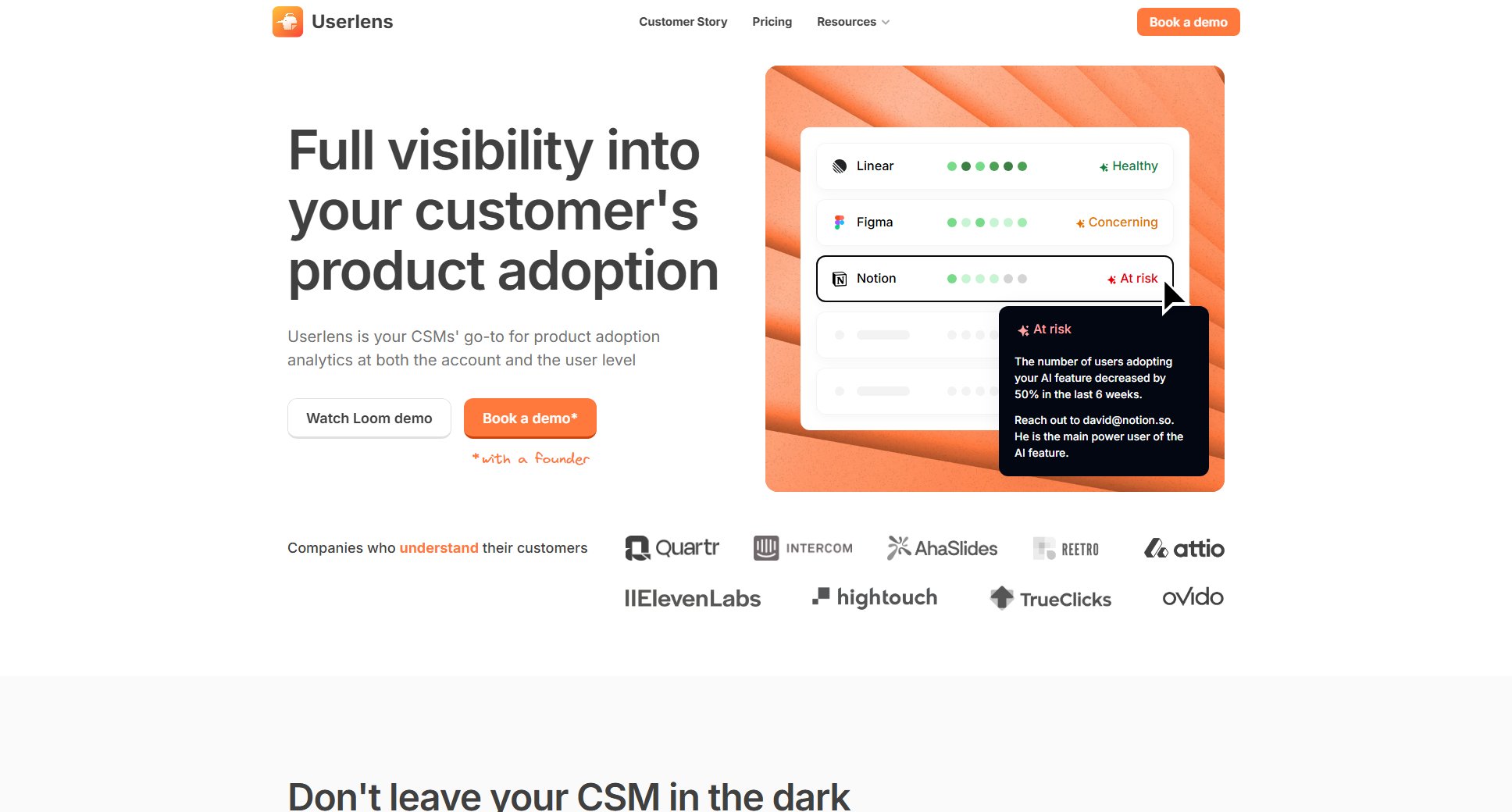
Userlens Official screenshot of the tool interface
What Can Userlens Do? Key Features
Account-Level Analytics
Userlens provides detailed analytics at the account level, allowing CSMs to understand the usage patterns of entire customer accounts. This includes tracking feature usage, active users, and overall account health, enabling teams to identify trends and take proactive measures.
User-Level Insights
Dive deeper into individual user behavior within an account. Identify power users, track engagement levels, and understand how different users interact with your product. This helps in personalizing customer success strategies and improving user adoption.
Cohort Analysis
Analyze groups of users or accounts based on shared characteristics or behaviors. Cohort analysis helps in understanding how different segments of your customer base are adopting your product over time, enabling targeted interventions.
AI Health Score
Userlens' AI-powered health score allows you to define what constitutes a healthy or at-risk account in plain language. The AI then calculates daily health scores for each account and alerts you via Slack or other channels if concerning trends are detected.
Proactive Alerts
Get real-time alerts for unusual activity or concerning trends in account usage. This enables CSMs to move from reactive to proactive customer management, addressing potential issues before they escalate.
CRM Integration
Userlens integrates with popular CRMs like HubSpot and Salesforce to pull in contextual data about your customers. This ensures that your customer success team has a complete, real-time picture of each account's health and activity.
Best Userlens Use Cases & Applications
Identifying Power Users
A CSM uses Userlens to identify power users within a large account. By analyzing user-level activity, they can recognize which stakeholders are most engaged and tailor their communication and support strategies accordingly.
Proactive Churn Prevention
Userlens detects a downward trend in feature usage for a key account. The CSM receives an alert and proactively reaches out to the customer, addressing their concerns before they consider canceling their subscription.
Onboarding Effectiveness
A company uses cohort analysis to compare the adoption rates of recently onboarded customers versus those onboarded six months ago. Insights from Userlens help them refine their onboarding process to improve early adoption.
Customer Health Monitoring
A CS team relies on Userlens' AI health score to monitor the overall health of their customer base. Daily updates and alerts ensure they can prioritize accounts that need immediate attention.
How to Use Userlens: Step-by-Step Guide
Sign up or book a demo to get started with Userlens. You can request a demo through the website or log in if you already have an account.
Connect Userlens to your existing product analytics tools (Mixpanel, Amplitude, PostHog, Segment) and CRMs (HubSpot, Salesforce) to pull in your customer data.
Define your health score criteria by describing in plain language what patterns indicate healthy or at-risk accounts. Userlens' AI will use these descriptions to calculate daily health scores.
Monitor your dashboard to view account-level and user-level analytics. Identify trends, power users, and potential churn risks at a glance.
Set up alerts for concerning trends or unusual activity. Receive notifications via Slack or other channels to take immediate action.
Use the insights gained to personalize your customer success strategies, improve product adoption, and reduce churn risk.
Userlens Pros and Cons: Honest Review
Pros
Considerations
Is Userlens Worth It? FAQ & Reviews
Userlens focuses on fast, clear, account-level product analytics, unlike traditional product analytics tools that are designed for product development. It provides a 30x faster way to view account stats like churn risk and active user count, and it integrates with Mixpanel, Amplitude, PostHog, and Segment to complement their data.
No, Userlens complements CRMs by visualizing product usage and engagement trends that CRMs typically don't show well. It integrates with HubSpot and Salesforce to provide a complete, real-time picture of your customer base.
Userlens' AI Health Score allows you to define healthy or at-risk patterns in plain language. The AI then calculates daily health scores for each account and alerts you via Slack or other channels if concerning trends are detected.
Userlens provides proactive alerts for unusual activity or concerning trends in account usage, such as declining feature usage or silent churn signals. Alerts can be delivered via Slack or other channels.
Yes, you can book a demo through the website to see Userlens in action and determine if it's the right fit for your team.