ECMaker AI Image Editor
Your one-stop AI image creation and editing platform
What is ECMaker AI Image Editor? Complete Overview
ECMaker AI Image Editor is a comprehensive platform that leverages cutting-edge AI technology to transform and enhance images with simple text prompts. Designed for creators, marketers, and businesses, it solves key pain points like time-consuming manual editing, expensive photoshoots, and inconsistent visual quality. The platform offers lightning-fast generation powered by advanced AI models including Flux Dev and Nano Banana, delivering professional-quality results in seconds. Target users include digital artists, marketing professionals, e-commerce businesses, content creators, and developers looking to integrate AI image generation into their workflows. ECMaker stands out with its combination of speed, precision controls, versatile style options, and comprehensive professional tools all in one platform.
ECMaker AI Image Editor Interface & Screenshots
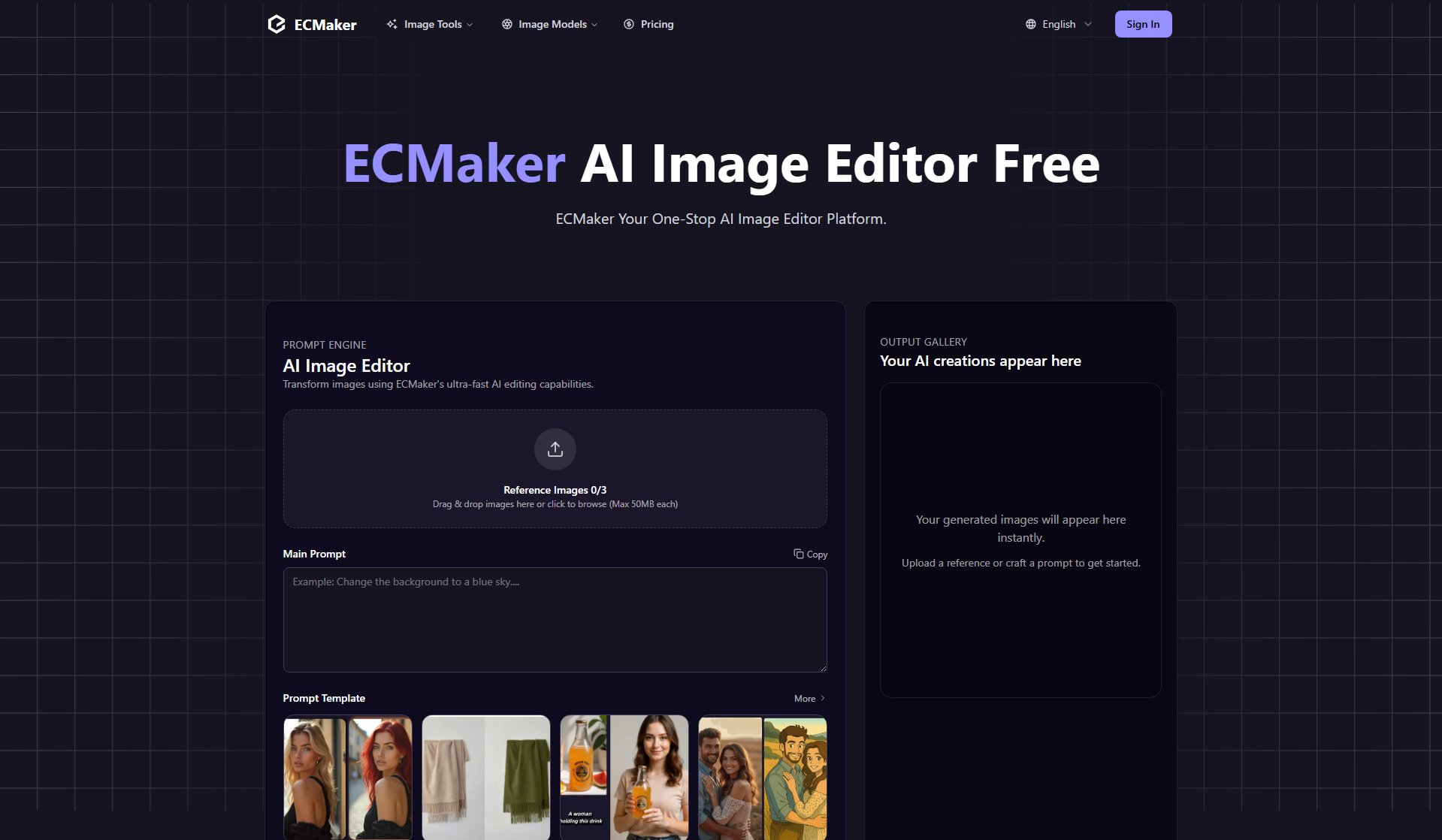
ECMaker AI Image Editor Official screenshot of the tool interface
What Can ECMaker AI Image Editor Do? Key Features
Advanced AI Models
ECMaker provides access to 15+ leading AI models including Flux Dev, Nano Banana, Midjourney, and GPT-4o. Each model specializes in different types of image generation and editing tasks, allowing users to choose the perfect tool for their specific needs. The Flux Dev model in particular offers exceptional quality and speed for most creative applications.
Lightning Fast Generation
The platform generates high-quality images in just 10-30 seconds thanks to optimized infrastructure and advanced processing algorithms. This rapid turnaround enables users to maintain creative momentum and significantly reduces production time compared to traditional methods or competing AI solutions.
Professional Image Tools
ECMaker offers a complete suite of AI-powered editing tools including upscaling, background removal, portrait generation, magic eraser, and sticker generation. These tools work seamlessly together, allowing professionals to achieve polished results without needing multiple specialized applications.
Creative Control
Users can fine-tune their creations with advanced parameter controls, style adjustments, and composition tools. The exclusive Flux and Nano Banana features provide unprecedented control over output, enabling consistent results across projects and the ability to match specific brand or style requirements.
Batch Processing
ECMaker's efficient batch processing capability allows users to handle multiple images simultaneously, dramatically increasing productivity for high-volume workflows. This is particularly valuable for marketing teams, e-commerce operations, and content creators managing multiple projects.
API Integration
The comprehensive API enables developers to integrate ECMaker's AI image generation capabilities into custom applications. With excellent documentation and responsive support, businesses can build automated workflows and customized solutions tailored to their specific needs.
Product Style Generation
E-commerce businesses can upload a single product image and generate multiple polished visuals perfect for listings and marketing. This feature eliminates the need for expensive product photoshoots while maintaining professional quality and brand consistency.
Text Integration
The AI can seamlessly integrate clear, natural text modifications into photos in seconds. This is perfect for adding titles, annotations, or brand logos without complex layer operations, saving designers significant time on common editing tasks.
Best ECMaker AI Image Editor Use Cases & Applications
E-commerce Product Imagery
Online retailers can use ECMaker to generate professional product photos from a single sample. The AI can create multiple angles, color variations, and styled scenes without expensive photoshoots. This is particularly valuable for businesses with large inventories or frequent product updates.
Marketing Campaign Visuals
Marketing teams can rapidly prototype and produce campaign assets. The batch processing feature allows creation of cohesive visual sets for social media, ads, and websites while maintaining brand consistency across all materials.
Content Creation
Bloggers, YouTubers, and social media influencers can generate unique thumbnails, featured images, and visual content to enhance their posts. The quick generation time means content can be created on-demand to match trending topics.
Concept Art & Prototyping
Designers and developers can visualize ideas quickly during the creative process. The AI's ability to interpret text prompts makes it ideal for exploring different artistic directions before committing to final designs.
API-Powered Automation
Businesses can integrate ECMaker's API to automate image generation for user profiles, dynamic product displays, or personalized marketing materials. This enables scalable, customized visual content without manual intervention.
How to Use ECMaker AI Image Editor: Step-by-Step Guide
Upload reference images (up to 3) or start with a blank canvas. The platform accepts drag-and-drop uploads of images up to 50MB each. These references help guide the AI's output if you have specific visual elements you want to incorporate.
Enter your text prompt describing the image you want to create. Use the prompt template feature for guidance or enter your own creative description. The more specific your prompt, the better the results will match your vision.
Select your preferred style and composition settings. Choose from various aspect ratios (1:1, 16:9, etc.), image sizes (768px to 1024px), and style transfer options to fine-tune the aesthetic of your output.
Click 'Generate Now' to create your image. The AI will process your request and typically deliver results within 10-30 seconds, depending on the complexity of the request and the model used.
Review your generated images in the Output Gallery. If needed, you can make adjustments to your prompt or settings and regenerate, or use the built-in editing tools to refine the image further.
Download your final image or use the batch processing feature to create multiple variations. All downloads are watermark-free and suitable for commercial use (depending on your plan).
ECMaker AI Image Editor Pros and Cons: Honest Review
Pros
Considerations
Is ECMaker AI Image Editor Worth It? FAQ & Reviews
ECMaker AI Image Editor is a comprehensive platform that uses advanced AI models to generate and edit images based on text prompts or reference images. Users simply input their creative vision and the AI produces high-quality results in seconds.
The platform offers access to 15+ leading models including Flux Dev, Nano Banana, Midjourney, GPT-4o, Imagen, Dall-E, and Stable Diffusion. Each has unique strengths for different types of image creation tasks.
Most images are ready within 10-30 seconds, depending on complexity. The platform's optimized infrastructure ensures rapid processing without compromising on quality.
Yes, the Pro plan includes a commercial use license. Generated images can be used for marketing, products, and business applications without restrictions.
The platform provides a complete suite of tools including upscaling, background removal, portrait generation, magic eraser, and sticker generation, all powered by AI for professional results.
Yes, ECMaker offers a comprehensive API for developers to integrate AI image generation into custom applications, supporting batch processing and advanced parameter controls.
Different operations consume different credit amounts based on tools used and image resolution. Credits are valid for one year and additional packages can be purchased as needed.