Privacy Redaction
100% offline browser tool for sensitive data redaction
What is Privacy Redaction? Complete Overview
Privacy Redaction by blank.tools is a browser-based sanitization tool that helps users protect sensitive information by automatically detecting and redacting personal data patterns. Operating completely offline, it ensures all data processing happens locally in the user's browser with no server transmission. The tool is particularly useful for professionals handling documents containing personal information, journalists working with sensitive sources, or anyone needing to share documents while protecting privacy. Its current beta version (v0.9.0-beta) demonstrates commitment to continuous improvement while already offering robust pattern detection capabilities.
Privacy Redaction Interface & Screenshots
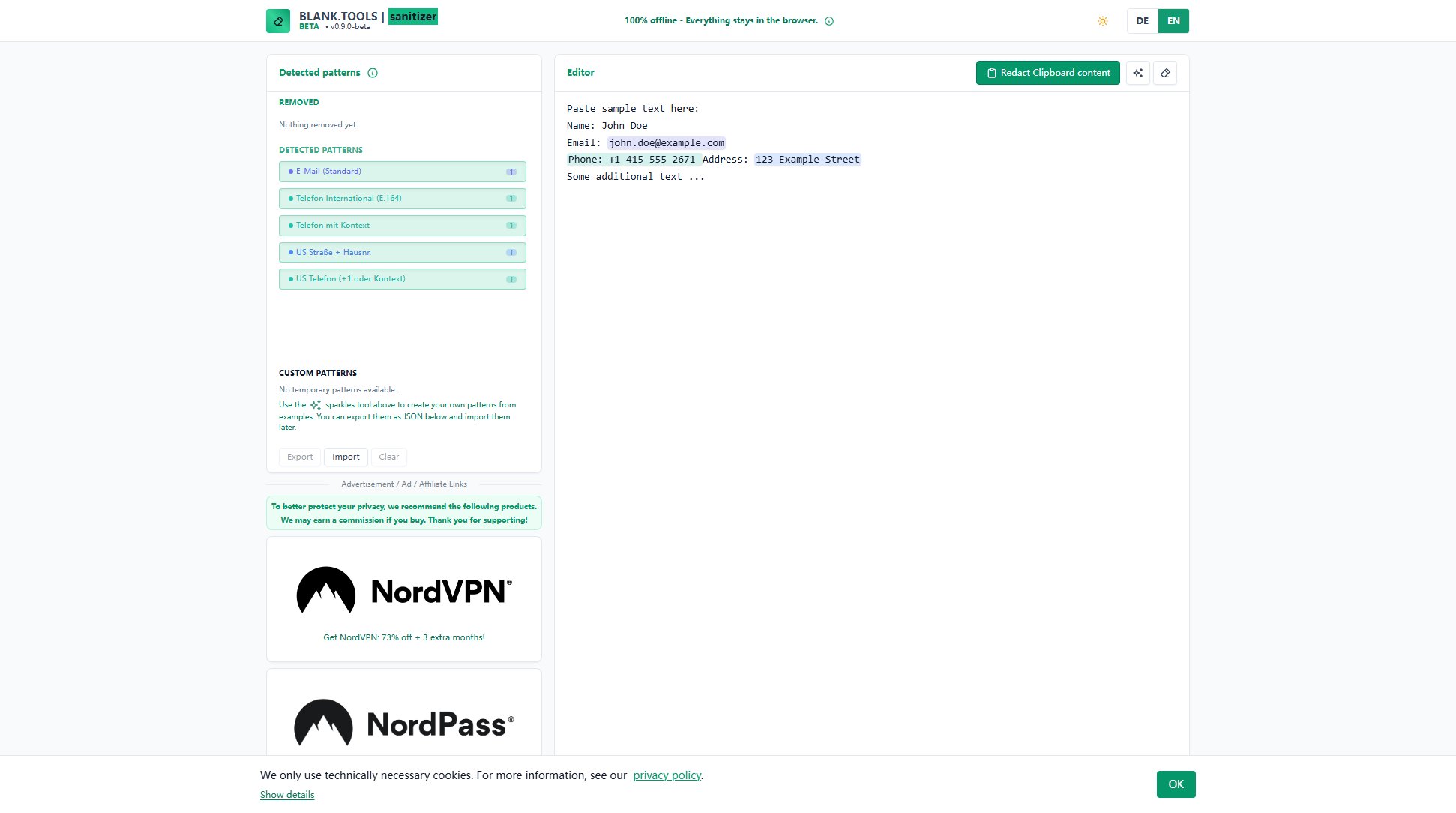
Privacy Redaction Official screenshot of the tool interface
What Can Privacy Redaction Do? Key Features
Offline Operation
All processing occurs locally in your browser with no data ever sent to external servers, ensuring maximum privacy and security for sensitive information.
Pattern Detection
Automatically identifies common sensitive data patterns including email addresses, international phone numbers (E.164 format), US addresses, and phone numbers with context.
Custom Pattern Creation
Users can create their own detection patterns through the sparkles tool, allowing customization for specialized redaction needs beyond the built-in patterns.
Pattern Management
Enables exporting and importing of custom patterns as JSON files, facilitating pattern sharing and reuse across different sessions or team members.
Clipboard Integration
Directly redacts content from clipboard, streamlining workflow when working with copied sensitive information from various sources.
Best Privacy Redaction Use Cases & Applications
Document Sharing
Before sharing documents containing personal information with third parties, use Privacy Redaction to automatically remove all sensitive data points while maintaining document structure.
Journalistic Work
Journalists can sanitize interview transcripts or documents received from sources to protect identities while preserving the essential content for publication.
Compliance Preparation
Help organizations prepare documents for GDPR or other privacy regulation compliance by systematically removing personal identifiers from texts.
Educational Examples
Create safe demonstration materials for training sessions by redacting real examples while keeping the format intact for educational purposes.
How to Use Privacy Redaction: Step-by-Step Guide
Paste your text containing sensitive information into the editor field or use the 'Redact Clipboard content' option for immediate processing.
The tool automatically scans and highlights detected patterns of sensitive information according to its built-in recognition rules.
Review the detected patterns in the 'Detected patterns' section, where you can see what types of information will be redacted.
For specialized needs, create custom patterns using the sparkles tool by providing examples of the data you want to detect.
Export your custom patterns as JSON if you want to save them for future use or share with colleagues.
Copy the redacted text from the editor for safe sharing, with all sensitive information properly sanitized.
Privacy Redaction Pros and Cons: Honest Review
Pros
Considerations
Is Privacy Redaction Worth It? FAQ & Reviews
No, Privacy Redaction operates 100% offline in your browser. All processing happens locally, and no data is ever transmitted to external servers.
The tool detects standard patterns including email addresses, international phone numbers (E.164 format), US addresses, and phone numbers with context. You can also create custom patterns for specialized needs.
Yes, you can export your custom patterns as JSON files and import them later or share them with colleagues while maintaining consistent redaction standards.
Currently Privacy Redaction is designed as a web application accessible through desktop browsers. Mobile compatibility may be improved in future updates.
The 'Redact Clipboard content' option automatically processes whatever text is currently in your clipboard, streamlining workflow when working with copied sensitive information.