Story to Manga Machine
Transform stories into manga and comics with AI
What is Story to Manga Machine? Complete Overview
The Story to Manga Machine is an AI-powered tool that automatically converts written stories into visually compelling manga or comic book panels. It solves the pain point of artists and writers who want to visualize their stories without needing advanced drawing skills. The tool analyzes text input, designs appropriate characters, plans comic layouts, and generates complete panels ready for sharing. Target users include amateur manga creators, comic book writers, content marketers, and storytelling enthusiasts who want to bring their narratives to life in visual form.
Story to Manga Machine Interface & Screenshots
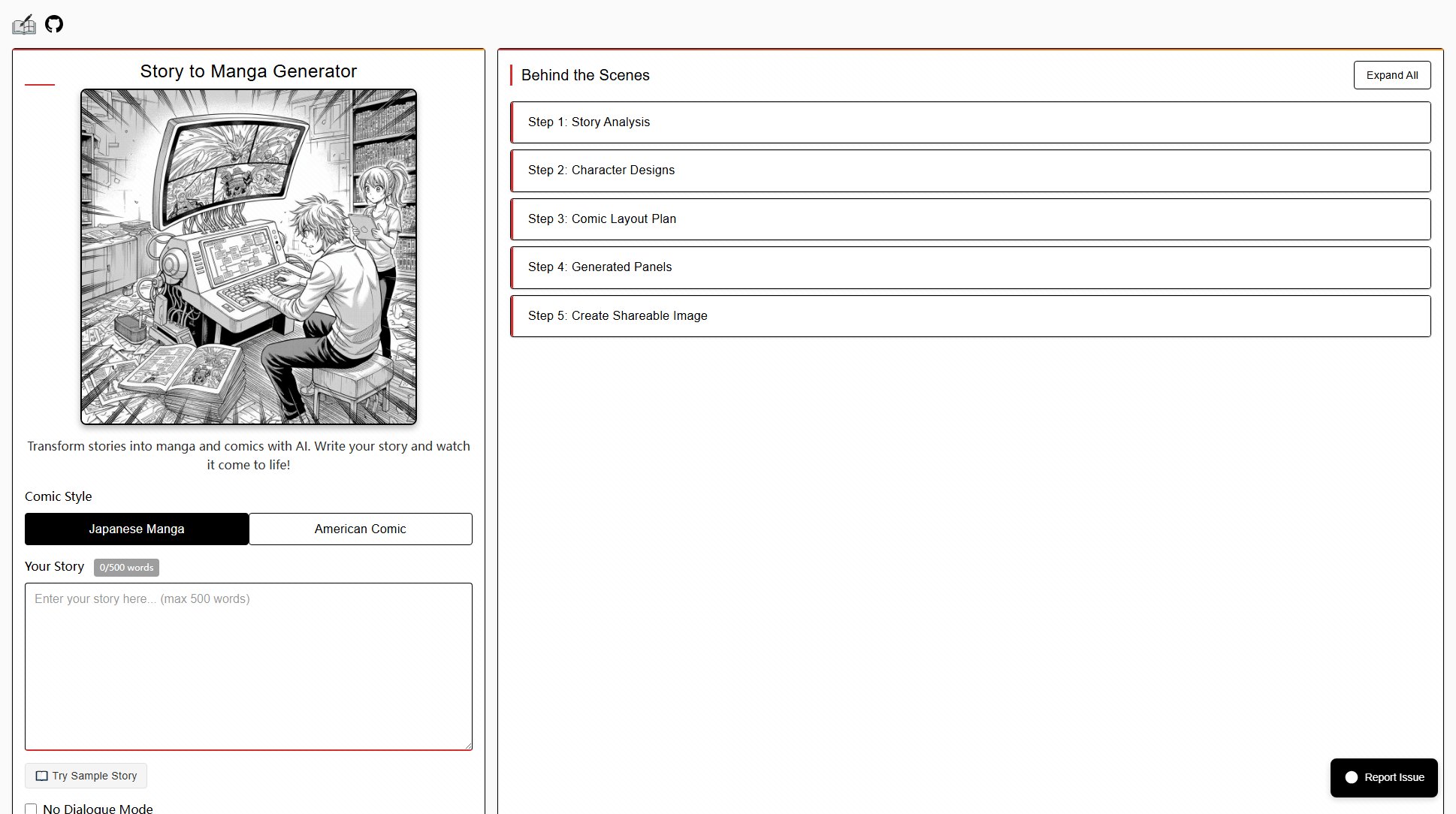
Story to Manga Machine Official screenshot of the tool interface
What Can Story to Manga Machine Do? Key Features
Multi-Style Comic Generation
Supports both Japanese manga and American comic styles, allowing users to choose the visual aesthetic that best fits their story. The AI adapts shading techniques, panel layouts, and character designs according to the selected style.
No Dialogue Mode
Offers a pure visual storytelling option that generates panels without speech bubbles. This is ideal for wordless comics, visual narratives, or when the artwork needs to stand alone without text interference.
Reference Image Integration
Allows users to upload character and setting reference images to guide the AI's visual generation. This ensures characters maintain consistency and settings match the writer's vision throughout the comic.
Automatic Panel Layout
The AI intelligently analyzes story beats and automatically creates optimal comic panel arrangements. It determines panel sizes, sequences, and transitions to best convey the narrative flow.
Shareable Output
Generates finished comics in social-media-friendly formats. Users can create composite images of their entire comic strip or individual panels for easy sharing across platforms.
Best Story to Manga Machine Use Cases & Applications
Amateur Comic Creation
Budding artists can prototype comic ideas without needing to draw every panel. The tool helps visualize stories before committing to manual artwork, saving time in the creative process.
Educational Storytelling
Teachers and students can transform written assignments into visual narratives. This makes creative writing more engaging and helps visual learners better understand storytelling concepts.
Content Marketing
Marketers can quickly create comic-style explanations or promotional content. The visual format increases engagement for tutorials, product stories, or brand narratives.
Writer's Visualization Tool
Authors can see their scenes visualized to check pacing and clarity. This helps identify which story moments translate effectively to visual media and which might need revision.
How to Use Story to Manga Machine: Step-by-Step Guide
Input your story text (up to 500 words) or use the sample story feature. The system will analyze narrative structure, key events, and dialogue to identify important moments for visualization.
Optionally upload reference images for characters or settings. These help the AI maintain visual consistency and match your creative vision throughout the generated comic.
Select your preferred style (Japanese manga or American comic) and toggle any special modes like 'No Dialogue' if desired. These choices will determine the visual language of your output.
Click 'Generate' and watch the AI process your story through multiple stages: story analysis, character design, layout planning, and finally panel generation.
Review and download your completed comic panels. The system provides options to create shareable image composites suitable for social media or further editing.
Story to Manga Machine Pros and Cons: Honest Review
Pros
Considerations
Is Story to Manga Machine Worth It? FAQ & Reviews
The current version accepts stories up to 500 words. This limitation ensures optimal quality in the generated manga panels and maintains reasonable processing times.
While the AI automatically designs characters based on your story, you can guide the generation by uploading reference images. This helps achieve closer matches to your vision.
The free version may have some download limitations, but all generated content remains accessible in your account. Check the pricing section for any premium options with increased limits.
Processing time varies by story length and complexity, but most generations complete within a few minutes. The interface shows progress through each stage of the creation pipeline.
While the tool doesn't include built-in editing features, you can download the generated images and modify them using any standard image editing software.