Tatask
Break down complex tasks into manageable steps effortlessly
What is Tatask? Complete Overview
Tatask is a revolutionary task management tool designed to help individuals and teams break down complex projects into manageable, actionable steps. By implementing a hierarchical task structure (Tatask Tree), it addresses the limitations of traditional to-do lists that often lead to overwhelm and procrastination. The platform is ideal for professionals, freelancers, students, and teams who need to manage multiple projects simultaneously. Tatask helps users conquer goals, eliminate stress, and regain focus by providing a clear visual representation of task progress and relationships. With features like infinite nesting, smart search, and progress tracking, Tatask transforms how people approach productivity in the digital age.
Tatask Interface & Screenshots
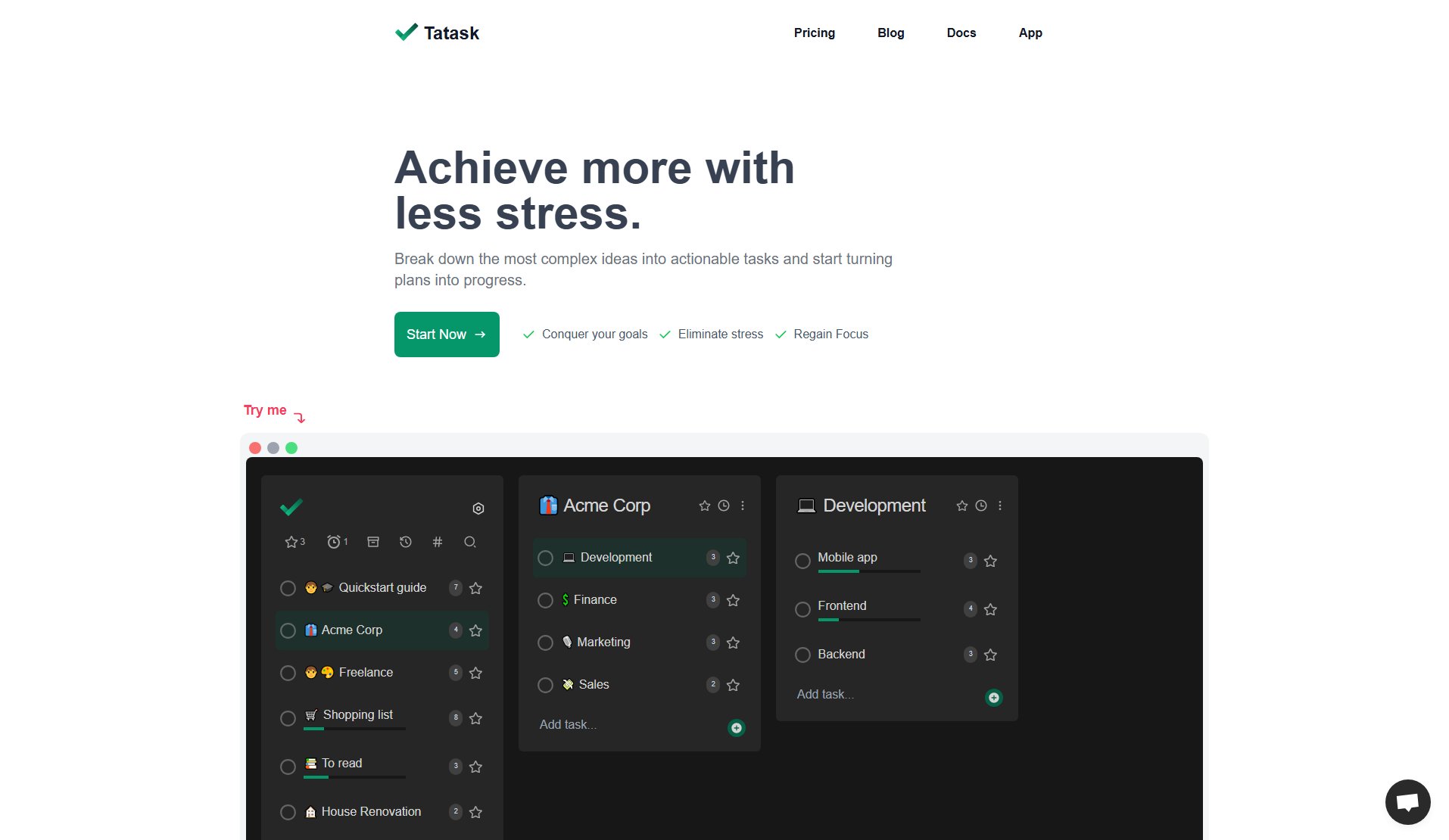
Tatask Official screenshot of the tool interface
What Can Tatask Do? Key Features
Infinite Nesting
Break down any project into unlimited sub-tasks, creating a natural hierarchy that mirrors your thought process. This feature allows you to drill down to the most granular level of any project while maintaining visibility of the bigger picture.
Smart Search
Quickly locate any task or sub-task with Tatask's powerful search functionality. This saves valuable time when working with complex projects containing hundreds of tasks, ensuring you can always find what you need instantly.
Flexible Tagging System
Organize tasks across projects with customizable tags. Create tags for departments (Development, Marketing), priorities (Urgent, Backlog), or any other categorization system that fits your workflow.
Visual Progress Tracking
See your advancement at a glance with intuitive progress bars that update automatically as you complete tasks. This visual feedback keeps you motivated and provides clear indicators of project status.
Customizable Workspace
Personalize your Tatask environment with themes, accent colors, and background images. Choose between light, dark, or system themes to create a workspace that matches your preferences and reduces eye strain.
Cross-Platform Availability
Access your tasks anywhere with native apps for iOS, Android, and desktop. All changes sync automatically across devices, and full offline support means you can stay productive even without internet access.
Best Tatask Use Cases & Applications
Freelance Project Management
Freelancers juggling multiple clients can use Tatask to maintain separate project trees for each client, with detailed breakdowns of deliverables, deadlines, and dependencies. The hierarchical structure prevents overwhelm while ensuring no detail is overlooked.
Academic Research Organization
Students and researchers can break down complex papers or theses into manageable sections, with tasks for literature review, data collection, analysis, and writing. Progress tracking helps maintain momentum throughout long-term projects.
Home Renovation Planning
Homeowners can map out renovation projects room by room, with sub-tasks for demolition, electrical work, painting, and furnishing. The visual structure helps coordinate contractors and track completion of each project phase.
Team Project Collaboration
Teams can assign entire branches of tasks to members while maintaining visibility of how individual contributions fit into the larger project. Real-time syncing ensures everyone stays aligned as the project evolves.
How to Use Tatask: Step-by-Step Guide
Create your main project or goal as a parent task. This could be anything from 'Website Redesign' to 'Personal Development Plan.' Think of this as the trunk of your task tree.
Break down the main project into major components or phases. These become your first-level sub-tasks (branches). For a website redesign, this might include 'Design,' 'Development,' and 'Content Creation.'
Continue breaking down each component into smaller, actionable tasks (leaves). The development branch might include 'Set up staging environment,' 'Implement responsive design,' and 'Test cross-browser compatibility.'
Assign tags to tasks for easy filtering and organization. Tags can represent departments, priorities, or any other relevant categories that help you manage your workflow.
Track progress visually through the automatic progress bars. As you complete sub-tasks, you'll see the completion percentage increase for parent tasks, giving you a clear picture of overall project advancement.
Use the smart search feature to quickly locate specific tasks when working with complex projects containing hundreds of items, ensuring you never lose track of important actions.
Tatask Pros and Cons: Honest Review
Pros
Considerations
Is Tatask Worth It? FAQ & Reviews
Unlike flat to-do lists, Tatask uses a hierarchical tree structure that mirrors how we naturally think about projects. This allows for breaking down complex goals while maintaining visibility of the bigger picture, preventing the overwhelm caused by traditional lists.
Yes, Tatask offers team functionality where you can assign branches of tasks to members, track collective progress, and sync changes in real-time across all team members' devices.
Absolutely! All paid plans come with a 30-day free trial so you can experience Tatask's full capabilities before committing to a subscription.
Tatask is available on iOS, Android, and desktop browsers with full offline functionality. Your data syncs automatically when you reconnect to the internet.
While Tatask doesn't currently offer direct import from other apps, its intuitive interface makes manual migration straightforward. Many users find the process valuable as it forces reconsideration of task organization.