Nano Banana AI
Google-powered AI image editor with lightning-fast natural language processing
What is Nano Banana AI? Complete Overview
Nano Banana AI revolutionizes image editing by combining Google's Gemini 2.5 Flash technology with advanced natural language processing. This innovative tool eliminates the need for Photoshop skills, allowing users to edit images simply by describing what they want in plain language. Targeted at creators, designers, businesses, and anyone needing professional-quality image editing without technical expertise, Nano Banana AI solves key pain points like slow editing processes, complex tools, and maintaining character consistency across edits. With processing times of just 1-2 seconds per edit and the ability to maintain perfect character identity through multiple edits, Nano Banana AI represents the future of AI-powered image manipulation.
Nano Banana AI Interface & Screenshots
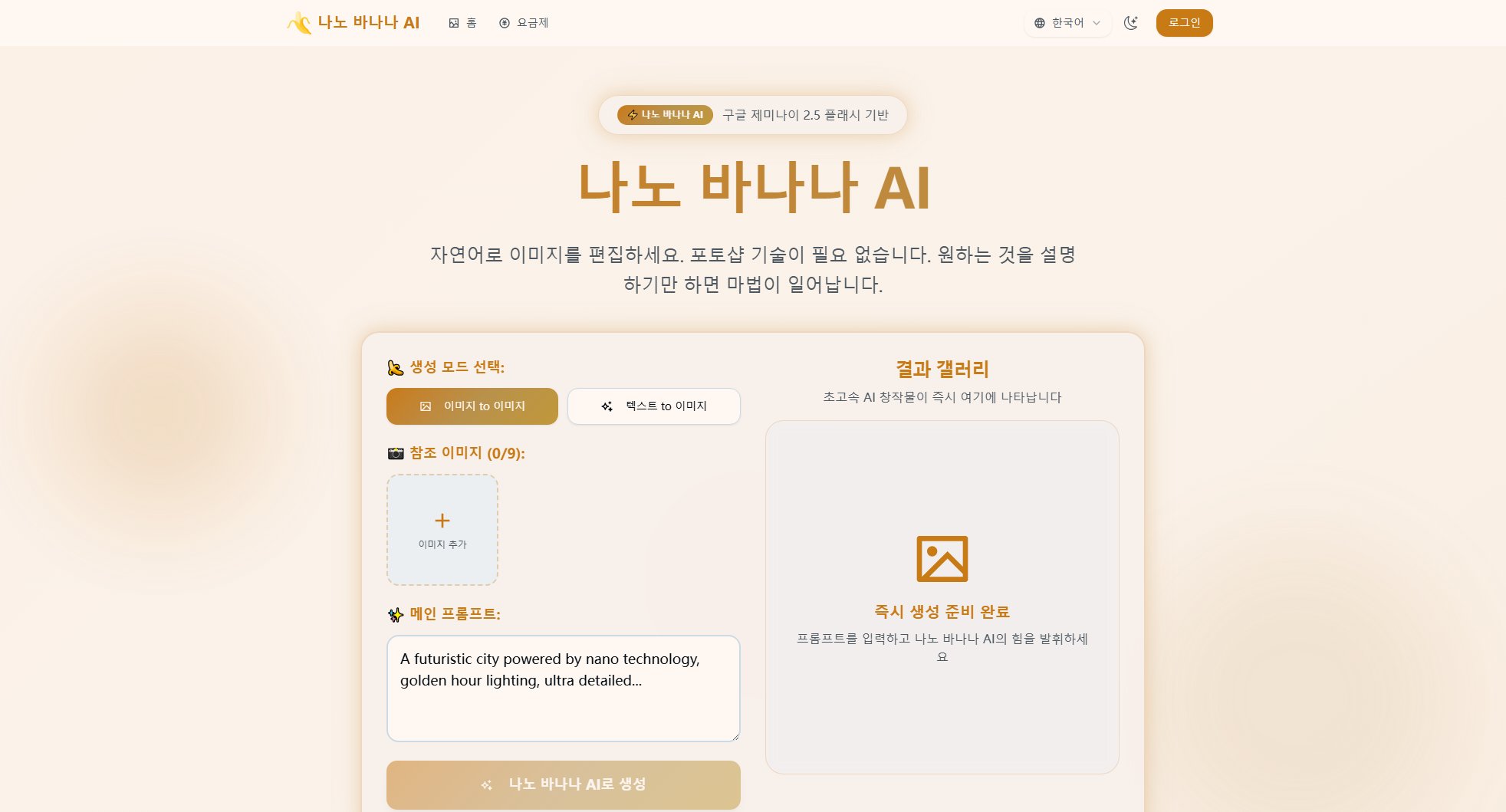
Nano Banana AI Official screenshot of the tool interface
What Can Nano Banana AI Do? Key Features
Natural Language Editing
Describe your desired changes in plain language without needing complex tools or layers. Nano Banana AI understands your instructions and handles all technical implementation automatically, making professional editing accessible to everyone.
Character Consistency
Maintain perfect character identity across all edits. Whether changing backgrounds, styles, or poses, Nano Banana AI preserves facial recognition, style preservation, and feature matching to keep subjects looking exactly like themselves.
Lightning-Fast Processing
Get results in 1-2 seconds rather than minutes. Nano Banana AI's optimized pipeline delivers professional-quality edits faster than traditional tools, with real-time previews and instant processing with no wait times.
Multi-Image Blending
Perfectly blend multiple photos into one consistent image. Whether creating composite scenes, family photos, or product showcases, Nano Banana AI handles photo synthesis, scene mixing, and background blending seamlessly.
Multi-Turn Editing
Continually refine your vision with iterative edits. Add bookshelves, place furniture, adjust lighting - each edit builds upon previous ones for step-by-step editing, continuous improvement, and complexity building.
Style Transfer Magic
Apply one image's style to another with perfect artistic consistency. Transfer petal textures to shoes or butterfly wing patterns to dresses with Nano Banana AI's advanced style transfer capabilities.
Best Nano Banana AI Use Cases & Applications
E-commerce Product Photography
Fashion retailers use Nano Banana AI to expand product images across color variations and styles, reducing photography costs by 70% while increasing conversion rates by 34%. Example: Removing backgrounds and placing products on white studio backgrounds with soft shadows.
Professional Headshots
Transform casual photos into professional headshots with sophisticated backgrounds in seconds. Example: Replacing backgrounds with professional office environments and adding soft studio lighting.
Real Estate Marketing
Architects create interior mockups that skip two rounds of client revision requests, achieving 80% faster customer approvals. Example: Converting empty room backgrounds into furnished living spaces with modern furniture.
Game Character Art
Game studios generate thousands of NPC character portraits with consistent identities at a fraction of traditional costs ($10K vs $150K). Example: Changing outfits to medieval armor while maintaining exact facial features.
Fashion Design
Apply butterfly wing rainbow patterns to evening gowns or flower textures to accessories instantly. Example: Transferring rainbow patterns from butterfly wings to an evening gown.
How to Use Nano Banana AI: Step-by-Step Guide
Select your creation mode: Choose between 'Image to Image' or 'Text to Image' depending on whether you're starting with an existing image or creating from scratch.
Add reference images (up to 9): Upload any images you want to use as references or bases for your edits. These could include portraits, objects, or style references.
Enter your main prompt: Describe in natural language what you want to create or modify. For example: 'A futuristic city powered by nano technology, golden hour lighting, ultra detailed...'
Generate your result: Click create and watch as Nano Banana AI processes your request in 1-2 seconds, delivering professional-quality results instantly.
Refine with multi-turn editing: If needed, make additional edits by describing further changes. Each edit maintains consistency with previous versions while implementing your new instructions.
Download your final image: Save your creation with watermark-free downloads that include full commercial use rights.
Nano Banana AI Pros and Cons: Honest Review
Pros
Considerations
Is Nano Banana AI Worth It? FAQ & Reviews
Nano Banana AI combines Google's latest image generation models with natural language processing. Simply describe desired changes and the AI handles complex edits while maintaining character consistency, unlike traditional editors that require manual tools.
Most edits process in 1-2 seconds, feeling like real-time editing rather than batch processing, thanks to Google's optimized Gemini 2.5 Flash image model.
Yes! Identity preservation is a core feature. Change backgrounds, angles, or colors while maintaining perfect consistency of people or objects throughout all modifications.
You can perform background replacement, style transfer, multi-image blending, object removal/addition, color adjustments, and complex scene modifications - all through simple text descriptions.
All generated/edited images include visible and invisible SynthID watermarks. You have full commercial rights for business use, social media, and client work.
The system can blend multiple images and perform multi-turn edits on the same image, supporting complex workflows including storytelling sequences and batch style applications.