Aidio
AI-powered audio to text transcription made simple
What is Aidio? Complete Overview
Aidio is an advanced AI-powered online tool that converts audio files into accurate text transcriptions quickly and efficiently. Designed for professionals, students, and anyone needing fast transcription services, Aidio eliminates the need for manual typing with its smart speech recognition technology. The platform supports multiple audio formats including MP3, MP4, MPEG, MPGA, M4A, WAV, and WEBM, with a maximum file size of 25MB. It offers real-time transcription capabilities, punctuation optimization, and format adjustment features. Aidio is particularly valuable for journalists, researchers, content creators, and business professionals who regularly work with audio recordings and need reliable text conversions. The service includes free trial credits for new users and offers various subscription plans to meet different usage needs.
Aidio Interface & Screenshots
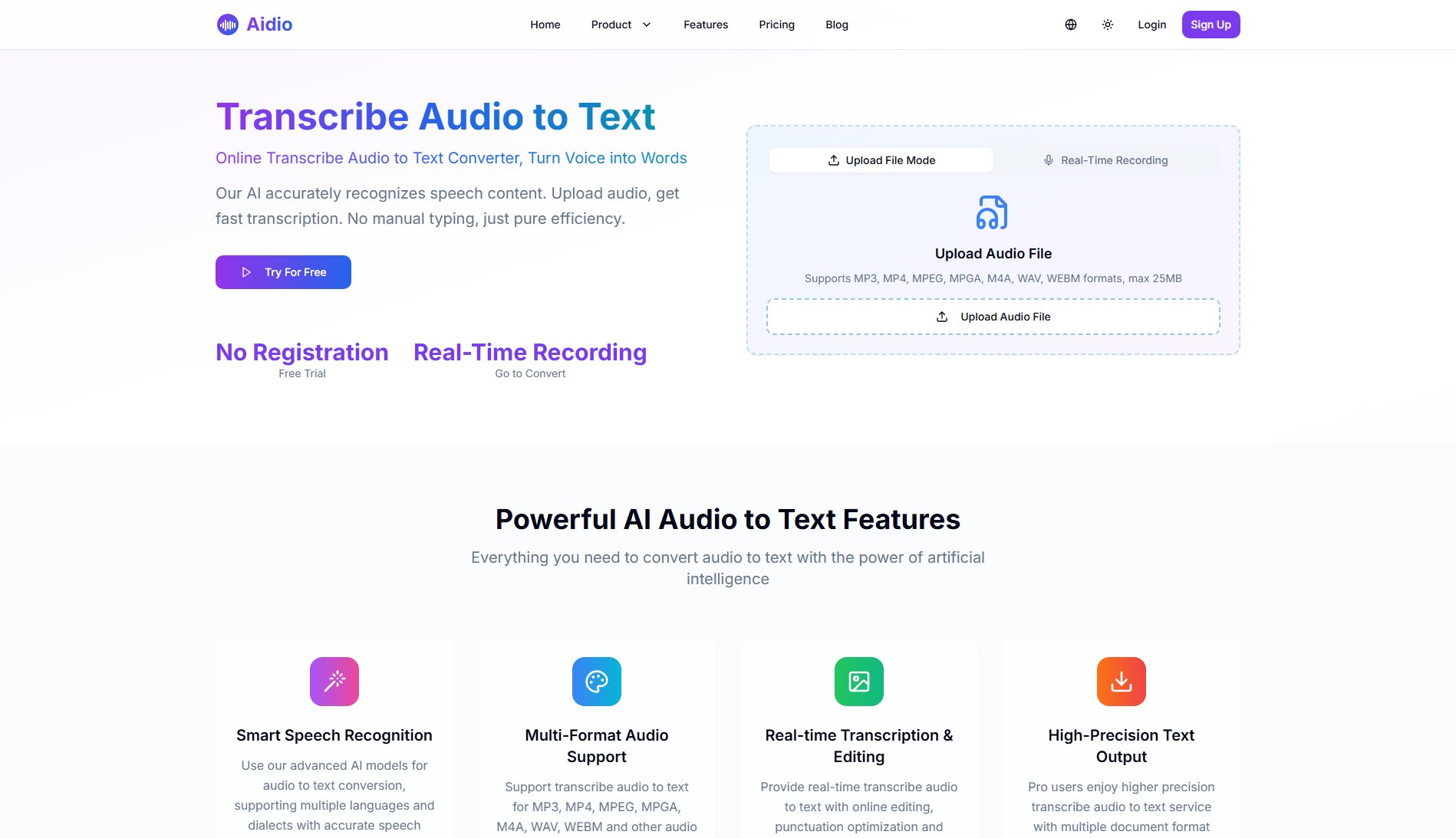
Aidio Official screenshot of the tool interface
What Can Aidio Do? Key Features
Smart Speech Recognition
Utilizes advanced AI models to accurately recognize and convert speech to text across multiple languages and dialects. The system automatically detects the language in your audio and processes the transcription accordingly, ensuring high accuracy even with diverse accents or background noise.
Multi-Format Audio Support
Supports all common audio formats including MP3, MP4, MPEG, MPGA, M4A, WAV, and WEBM without requiring any format conversion. This flexibility allows users to work with files from various recording devices and platforms seamlessly.
Real-time Transcription & Editing
Offers live transcription capabilities with simultaneous editing features. Users can adjust punctuation, format text, and make corrections during the transcription process, significantly reducing post-processing time.
High-Precision Text Output
Delivers professional-grade transcription accuracy, especially for Pro users. The system provides multiple document format exports suitable for commercial and academic use, with options for plain text, formatted documents, and more.
Secure Processing
Ensures complete data privacy by processing all audio files securely without saving the original content. The system maintains strict confidentiality and never shares transcribed content with third parties.
Best Aidio Use Cases & Applications
Journalism Interviews
Journalists can quickly transcribe interviews and press conferences, saving hours of manual transcription work. The accurate time-stamped transcriptions help in creating articles faster while maintaining precise quotes.
Academic Research
Researchers conducting qualitative studies can transcribe focus group discussions or interviews efficiently. The multiple language support makes it ideal for international research projects with diverse participants.
Content Creation
Podcasters and video creators can generate show notes, subtitles, and transcripts for accessibility. The real-time editing features allow for quick polishing of content before publication.
Legal Documentation
Law firms can transcribe client meetings, depositions, and court recordings with high accuracy. The secure processing ensures confidential legal information remains protected.
Business Meetings
Professionals can convert important meeting recordings into searchable, shareable documents. Team members who couldn't attend can quickly review discussion points and action items.
How to Use Aidio: Step-by-Step Guide
Upload your audio file by dragging and dropping or clicking the upload button. The system supports MP3, MP4, MPEG, MPGA, M4A, WAV, and WEBM formats with a maximum file size of 25MB.
Select your preferred output format (default is plain text) and any additional transcription settings if needed. The system automatically detects the audio language but allows manual selection if required.
Click 'Start Transcription' to begin the conversion process. For guest users, the system will use available free credits (5 per month). Logged-in users with subscriptions will use their allocated credits.
Wait for the AI to process your audio. Conversion time varies based on file length and quality, typically taking a few seconds to one minute per minute of audio.
Review and edit the transcribed text directly in the interface. The system provides punctuation optimization and formatting tools to refine your output before finalizing.
Download or copy your final transcription. Pro users can export in multiple document formats suitable for various professional applications.
Aidio Pros and Cons: Honest Review
Pros
Considerations
Is Aidio Worth It? FAQ & Reviews
Yes, you'll receive 5 free credits (equivalent to 5 minutes of transcription) in Guest Mode each month. New registered users get 10 minutes of free transcription to test the service.
Aidio uses advanced AI speech recognition models to analyze your audio content. The system processes the speech patterns, converts them to text, and applies punctuation and formatting for readable output.
Absolutely. We process all audio files securely and don't save your original audio data. Transcribed content remains confidential and is never shared with third parties.
We support MP3, MP4, MPEG, MPGA, M4A, WAV, and WEBM formats with a maximum file size of 25MB. No format conversion is needed before uploading.
Yes, all text generated through Aidio can be used for commercial purposes. You retain full rights to your transcribed content without any restrictions.
We welcome feedback to improve our service. If you're unsatisfied with results, please provide details about the issues encountered so we can enhance our AI models.
Processing time depends on audio length and quality. Typically, one minute of audio takes between a few seconds to one minute to transcribe. Longer files may take proportionally longer.
Yes, our system supports multiple languages including English, Chinese, Japanese, Korean and other major languages. The AI automatically detects the language in your audio.